
Bun 是與 Node 和 Deno 競爭的新 JavaScript Runtime,具有更快的速度和其他一些特性。本文將介紹如何使用 Bun 建立完整的 API。
Bun.js 是一種新的 JavaScript 執行環境,與 Node.js 和 Deno 相似,但速度更快、更獨立。它採用快速的底層語言 Zig 編寫,並利用了為 Safari 等 Webkit 瀏覽器提供支援的 JavaScriptCore Engine。Zig 與 JavaScriptCore 引擎的結合使 Bun 成為速度最快的 JavaScript 執行環境時之一。
此外,Bun 不僅僅是一個執行環境。它還是軟體包管理器、測試執行程式和捆綁程式。在本教學中,您將學習如何使用 Elysia、PostgreSQL 和 Prisma 通過 Bun 建立一個簡單的配方共享 API。
設定開發環境
要使用 Bun,首先要在系統中安裝它。執行以下命令將 Bun 安裝到 macOS、Linux 或 Windows Subsystem for Linux (WSL)。
curl -fsSL https://bun.sh/install | bash
目前,Bun 僅有一個用於 Windows 的實驗版本,僅支援執行環境。
安裝 Bun 後,執行下面的命令建立並 cd 到專案目錄:
mkdir recipe-sharing-api && cd recipe-sharing-api
接下來,執行下面的命令初始化一個新的 Bun 應用程式:
bun init
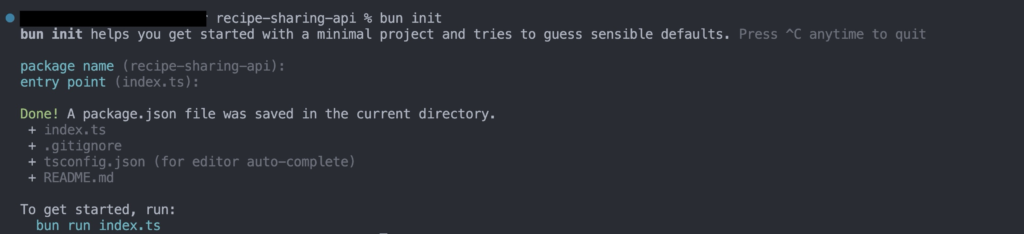
上述命令將提示您輸入應用程式的軟體包名稱和入口點。您可以按 ENTER 鍵選擇預設值,如下圖所示。
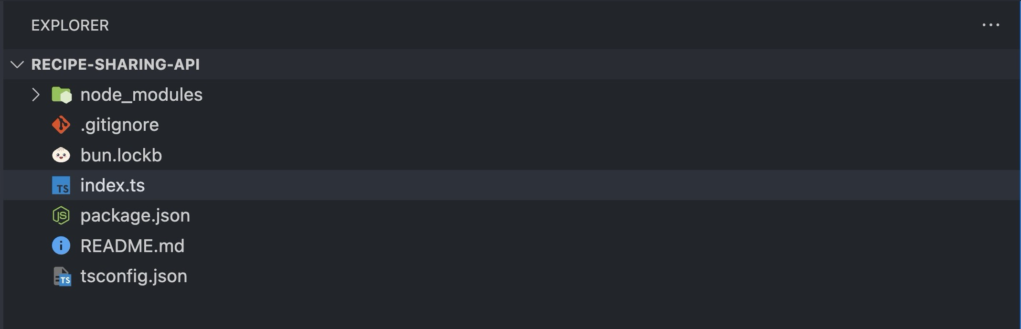
當前目錄應該如下圖所示。
接下來,執行下面的命令安裝所需的依賴項:
bun add elysia @elysiajs/cookie prisma @prisma/client dotenv pg jsonwebtoken@8.5.1
執行安裝相應型別:
bun add -d @types/jsonwebtoken
您安裝的依賴項是:
- Elysia:Elysia 是 Bun 的網路框架,可簡化與 Bun 的協作,類似於 Express 對 Node.js 的作用。
- Prisma:Prisma 是 JavaScript 和 TypeScript 的物件關係對映器(ORM)。
- Dotenv:Dotenv 是一個 NPM 軟體包,用於將
.env檔案中的環境變數載入到process.env中。 - PG:PG 是 PostgreSQL 的本地驅動程式。
- jsonwebtoken@8.5.1: 實現 JWT 標準(8.5.1 版)的軟體包。
設定資料庫
食譜共享 API 將涉及三個表:Recipes, Users, 和 Comments。使用者可以建立和共享菜譜,檢視他人的菜譜,並對菜譜發表評論。
執行以下命令在應用程式中使用 PostgreSQL 初始化 Prisma:
bunx prisma init --datasource-provider postgresql
上述命令會建立一個 .env 檔案和一個 Prisma 資料夾。您將在 Prisma 資料夾中找到 schema.prisma 檔案。該檔案包含資料庫連線的配置。
接下來,開啟 .env 檔案,將虛擬資料庫連線 URI 替換為資料庫的連線 URI。
建立 Prisma 模型
Prisma 模型代表資料庫中的表。Prisma 模式中的每個模型都對應資料庫中的一個表,定義其結構。
開啟 schema.prisma 檔案,新增以下程式碼塊以建立 User 模型。
model User {
id        Int      @id @default(autoincrement())
email     String   @unique
name      String?
password  String
createdAt DateTime @default(now())
updatedAt DateTime @updatedAt
recipies  Recipe[]
comments  Comment[]
}
上面的程式碼塊代表 User 模型。它包含應用程式所需的所有使用者資訊,如電子郵件、姓名、密碼、食譜和評論。
當新使用者註冊時,您將建立一個新的 User 模型例項,當使用者嘗試登入時,您將獲取該例項,並將儲存的資訊與登入請求中傳送的資訊進行比較。
接下來,將下面的程式碼塊新增到 schema.prisma 檔案中,以建立 Recipe 模型:
model Recipe {
id        Int      @id @default(autoincrement())
title     String
body      String
createdAt DateTime @default(now())
updatedAt DateTime @updatedAt
user      User     @relation(fields: [userId], references: [id])
userId    Int
comments  Comment[]
}
上面的程式碼塊表示 Recipe 模型。它包含應用程式所需的所有配方資訊,如標題、正文和建立配方的使用者資訊。
當使用者建立配方時,您將建立一個新的 Recipe 模型例項。
然後,將下面的程式碼塊新增到 schema.prisma 檔案中,以建立 Comment 模型:
model Comment {
id        Int      @id @default(autoincrement())
body      String
createdAt DateTime @default(now())
updatedAt DateTime @updatedAt
user      User     @relation(fields: [userId], references: [id])
userId    Int
recipe   Recipe  @relation(fields: [recipeId], references: [id])
recipeId Int
}
上面的程式碼塊代表了您的 Comment 模型。它包含應用程式所需的所有註釋資訊,包括正文、日期、建立註釋的使用者以及註釋的配方。
當使用者對配方發表評論時,就會建立一個新的 Comment 模型例項。
最後,執行下面的命令生成並執行遷移:
bunx prisma migrate dev --name init
您可以將 init 替換為您選擇的任何名稱。
執行上述命令將確保 Prisma 模式與資料庫模式同步。
建立服務和控制器
在專案中建立服務和控制器有助於組織程式碼,使其更易於維護。
執行以下命令,在專案根目錄下建立 controllers 和 services 資料夾:
mkdir controllers && mkdir services
接下來,在 services 資料夾中建立以下檔案:
user.service.ts: 該檔案包含與使用者註冊和登入相關的所有邏輯。recipe.service.ts: 該檔案包含建立和檢視食譜的所有邏輯。comment.service.ts: 該檔案包含對菜譜進行評論的所有邏輯。auth.service.ts: 該檔案包含驗證使用者的邏輯。
然後,在 controllers 資料夾中建立以下檔案:
comments.controller.ts: 該檔案包含評論的所有控制器邏輯。recipe.controller.ts: 該檔案包含配方控制器的所有邏輯。user.controller.ts: 該檔案包含使用者身份驗證的所有控制器邏輯。
實現服務邏輯
服務是功能或邏輯的獨特單元,旨在執行特定任務。
要實現這一點,請開啟 auth.service.ts 檔案並新增以下程式碼塊。
//auth.service.ts
import jwt from "jsonwebtoken";
export const verifyToken = (token: string) => {
let payload: any;
//Verify the JWT token
jwt.verify(token, process.env.JWT_SECRET as string, (error, decoded) => {
if (error) {
throw new Error("Invalid token");
}
payload = decoded;
});
return payload;
};
export const signUserToken = (data: { id: number; email: string }) => {
//Sign the JWT token
const token = jwt.sign(
{
id: data.id,
email: data.email,
},
process.env.JWT_SECRET as string,
{ expiresIn: "1d" }
);
return token;
};
上面的程式碼塊匯出了兩個函式: verifyToken 和 signUserToken 。verifyToken 函式接收使用者的訪問令牌並檢查其有效性。如果有效,它就會解碼令牌並返回令牌中包含的資訊,否則就會出錯。
signUserToken 函式將使用者資料作為有效載荷,建立並返回有效期為一天的 JWT。
接下來,開啟 user.service.ts 檔案並新增下面的程式碼塊:
//user.service.ts
import { prisma } from "../index";
import { signUserToken } from "./auth.service";
export const createNewUser = async (data: {
name: string;
email: string;
password: string;
}) => {
try {
const { name, email, password } = data;
//Hash the password using the Bun package and bcrypt algorithm
const hashedPassword = await Bun.password.hash(password, {
algorithm: "bcrypt",
});
//Create the user
const user = await prisma.user.create({
data: {
name,
email,
password: hashedPassword,
},
});
return user;
} catch (error) {
throw error;
}
};
export const login = async (data: { email: string; password: string }) => {
try {
const { email, password } = data;
//Find the user
const user = await prisma.user.findUnique({
where: {
email,
},
});
if (!user) {
throw new Error("User not found");
}
//Verify the password
const valid = await Bun.password.verify(password, user.password);
if (!valid) {
throw new Error("Invalid credentials");
}
//Sign the JWT token
const token = signUserToken({
id: user.id,
email: user.email,
});
return {
message: "User logged in successfully",
token,
};
} catch (error) {
throw error;
}
};
上面的程式碼塊匯出了兩個函式: createNewUser 和 login。createNewUser 函式接受使用者名稱、電子郵件和密碼。它使用 Bun 內建的密碼模組對密碼進行雜湊,並使用所提供的資訊建立一個新使用者。
login 函式接收使用者的憑據,並與資料庫中儲存的記錄進行驗證。如果匹配,就會為使用者建立一個訪問令牌;否則就會出錯。
接下來,開啟 recipe.service.ts 檔案,新增下面的程式碼塊。
//recipe.service.ts
import { prisma } from "../index";
export const createRecipe = async (data: {
title: string;
body: string;
userId: number;
}) => {
const { title, body, userId } = data;
//Create the recipe
const recipe = await prisma.recipe.create({
data: {
title,
body,
userId,
},
});
return recipe;
};
export const getAllRecipes = async () => {
//Get all recipes
const recipes = await prisma.recipe.findMany({
include: {
user: true,
comments: true,
},
});
return recipes;
};
export const getRecipeById = async (id: number) => {
//Get recipe by id and include the user
const recipe = await prisma.recipe.findUnique({
where: {
id,
},
include: {
user: true,
},
});
return recipe;
};
上面的程式碼塊匯出了三個函式: createRecipe、 getAllRecipies 和 getRecipeById。
createRecipe 函式根據作為引數傳遞的資料建立新配方並返回。 getAllRecipies 函式檢索並返回資料庫中的所有菜譜。getRecipeById 函式根據作為引數傳遞的 id 獲取配方並返回。
接下來,開啟你的 comments.service.ts 檔案並新增下面的程式碼塊。
//comments.service.ts
import { prisma } from "../index";
export const createComment = async (data: {
body: string;
recipeId: number;
userId: number;
}) => {
try {
const { body, recipeId, userId } = data;
//Create the comment for the recipe with the given id
const comment = await prisma.comment.create({
data: {
body,
userId,
recipeId: recipeId,
},
});
return comment;
} catch (error: any) {
throw error;
}
};
export const getAllCommentsForRecipe = async (recipeId: number) => {
//Get all comments for the recipe with the given id
const comments = await prisma.comment.findMany({
where: {
recipeId,
},
include: {
user: true,
},
});
return comments;
};
上面的程式碼塊匯出了兩個函式: createComment 和 getAllCommentsForRecipe。 createComment 為特定配方建立新的註釋,而 getAllCommentsForRecipe 則返回特定配方的所有註釋。
實現控制器邏輯
與使用 request 和 response 物件處理請求的 Express.js 不同,Elysia 使用上下文物件。
上下文物件提供的方法與 Express 的 request 和 response 物件類似。此外,Elysia 還會自動將控制器函式的返回值對映到響應中,並將其返回給客戶端。
要實現控制器邏輯,請開啟 user.controller.ts 檔案並新增以下程式碼塊。
//user.controller.ts
import Elysia from "elysia";
import { createNewUser, login } from "../services/user.service";
export const userController = (app: Elysia) => {
app.post("/signup", async (context) => {
try {
const userData: any = context.body;
const newUser = await createNewUser({
name: userData.name,
email: userData.email,
password: userData.password,
});
return {
user: newUser,
};
} catch (error: any) {
return {
error: error.message,
};
}
});
app.post("/login", async (context) => {
try {
const userData: any = context.body;
const loggedInUser = await login({
email: userData.email,
password: userData.password,
});
return loggedInUser;
} catch (error: any) {
console.log(error);
return {
error: error.message,
};
}
});
};
上面的程式碼塊實現了 /signup 和 /login 的控制器邏輯。
當使用者向 /signup 傳送 POST 請求時,控制器將從上下文物件( context.body )中提取請求正文,並將其傳遞給在 users.service.ts 檔案中建立的 createNewUser 函式。
當使用者向 /login 傳送 POST 請求時,控制器將從上下文物件中提取請求體,並將電子郵件和密碼傳遞給登入函式。如果使用者資訊正確無誤,控制器將返回一條成功訊息和訪問令牌。
接下來,開啟 recipe.controller.ts 檔案,新增下面的程式碼塊。
//recipe.controller.ts
import Elysia from "elysia";
import { createRecipe, getAllRecipes } from "../services/recipe.service";
import { verifyToken } from "../services/auth.service";
export const recipeController = (app: Elysia) => {
app.post("/create-recipe", async (context) => {
try {
const authHeader = context.headers["authorization"];
const token = authHeader && authHeader.split(" ")[1];
if (!token) {
throw new Error("Invalid token");
}
const verifiedToken = verifyToken(token as string);
const recipeData: any = context.body;
const newRecipe = await createRecipe({
title: recipeData.title,
body: recipeData.body,
userId: verifiedToken?.id,
});
return {
recipe: newRecipe,
};
} catch (error: any) {
return {
error: error.message,
};
}
});
app.get("/recipes", async () => {
try {
const recipes = await getAllRecipes();
return recipes;
} catch (error: any) {
return {
error: error.message,
};
}
});
};
上面的程式碼塊實現了 /create-recipe 和 /recipes 的控制器邏輯。
當使用者向 /create-recipe 發出 POST 請求時,控制器將檢查使用者是否擁有有效的訪問令牌(檢查使用者是否已登入)。
如果使用者沒有訪問令牌或令牌無效,控制器就會出錯。如果令牌有效,控制器將從上下文物件中提取配方詳細資訊,並將其傳遞給 createRecipe 函式。
當使用者向 /recipes 傳送 GET 請求時,控制器將呼叫 getAllRecipes 函式並返回所有菜譜。
接下來,開啟您的 comments.controller.ts,新增下面的程式碼塊。
//comments.controller.ts
import Elysia from "elysia";
import {
createComment,
getAllCommentsForRecipe,
} from "../services/comments.service";
import { verifyToken } from "../services/auth.service";
export const commentController = (app: Elysia) => {
app.post("/:recipeId/create-comment", async (context) => {
try {
const authHeader = context.headers["authorization"];
const token = authHeader && authHeader.split(" ")[1];
const recipeId = context.params.recipeId;
if (!token) {
throw new Error("Invalid token");
}
const verifiedToken = verifyToken(token as string);
const commentData: any = context.body;
const newComment = await createComment({
body: commentData.body,
recipeId: +recipeId,
userId: verifiedToken?.id,
});
return newComment;
} catch (error: any) {
return {
error: error.message,
};
}
});
app.get("/:recipeId/comments", async (context) => {
try {
const recipeId = context.params.recipeId;
const comments = await getAllCommentsForRecipe(+recipeId);
return {
comments,
};
} catch (error: any) {
return {
error: error.message,
};
}
});
};
上面的程式碼塊實現了 /:recipeId/create-comment 和 /:recipeId/comments 的控制器邏輯。
當使用者向 /:recipeId/create-comment 發出POST請求時,控制器會檢查使用者是否已登入,如果已登入,就會從上下文物件中提取評論詳情,並將其傳遞給 createComment 函式。
當使用者向 /:recipeId/comments 傳送 GET 請求時,控制器會從上下文物件( context.params.recipeId )中提取 recipeId,並將其作為引數傳遞給 getAllCommentsForRecipe,然後使用顯式型別強制將其轉換為數字。
設定 Bun-Elysia 伺服器
建立服務和控制器後,您必須設定一個伺服器來處理傳入的請求。
要建立 Bun-Elysia 伺服器,請開啟 index.ts 檔案並新增以下程式碼塊。
//index.ts
import Elysia from "elysia";
import { recipeController } from "./controllers/recipe.controller";
import { PrismaClient } from "@prisma/client";
import { userController } from "./controllers/user.controller";
import { commentController } from "./controllers/comments.controller";
//Create instances of prisma and Elysia
const prisma = new PrismaClient();
const app = new Elysia();
//Use controllers as middleware
app.use(userController as any);
app.use(recipeController as any);
app.use(commentController as any);
//Listen for traffic
app.listen(4040, () => {
console.log("Server is running on port 4040");
});
export { app, prisma };
上面的程式碼塊匯入了所有控制器、Elysia 框架和 PrismaClient。它還建立了 Prisma 和 Elysia 例項,並將控制器註冊為中介軟體,以便將所有傳入請求路由到正確的處理程式。
然後,它會監聽 4040 埠的傳入流量,並將 Elysia 和 Prisma 例項匯出到應用程式的其他部分。
最後,執行下面的命令啟動應用程式:
bun --watch index.ts
上述命令以觀察模式啟動 Bun 應用程式。
小結
在本文中,你將學習如何使用 Bun、Elysia、Prisma 和 Postgres 構建一個簡單的 API。您已經學會了安裝和配置 Bun、構建資料庫,以及實施模組化服務和控制器以實現高效的程式碼管理。您可以使用任何 API 測試工具(如 Postman 或 Insomnia)測試您構建的 API。



評論留言